
Introduction
If you want to learn about how to use console.log as a professional developer then you have to learn computer property names.
Let's Start
Assume that we have 4 different objects and each one is assigned to a variable. How can we log those objects to see what are they?
const obj1 = {name: 'Joe', age: 21, happy: true}
const obj2 = {name: 'Jane', age: 20, happy: true}
const obj3 = {name: 'Jona', age: 1, happy: false}
const obj4 = {name: 'Jake', age: 2, happy: true}
Common Way
Of course, the first thing that comes into mind is to use pretty console.log :)
console.log(obj1);
console.log(obj2);
console.log(obj3);
console.log(obj4);
Result;
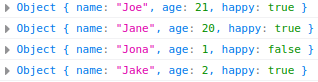
As you can see we could log all variables. If I ask you which of those logs represents a variable named obj2 can you tell me that without looking and remembering the code? Of course not! Because you don't know that.
Better Way
But hey look there is a better way called Computed Property Names and basically, we put all those variables into an object in console.log like as below;
console.log({obj1, obj2, obj3, obj4})
As a result, we have 1 line of code and 1 log that represents the whole data as below.

If I ask you the same question again Which one of those data represents the variable named obj2?
Then you tell me the object which has a name attribute as Jane is the obj2 without requiring to check the code.
About the author
Software Engineer with over 8 years of experience and specialized in PHP, Laravel Framework, ReactJS, TailwindCSS, MySQL, and PostgreSQL.
Comments
Join the discussionNo comments yet. Be the first to comment.